| Info | ||
|---|---|---|
| ||
Researching, Implementation, and Documentation (All at once!) |
Finally getting around to this project; alot of friends have mentioned / suggested the idea in the past as a project, but I've never had the means to complete it.
Now I do, so I figured better now than never!
Foreword
Explain:
Before I get started, I'd like to lay out a few ideas, or questions and answers so that you can determine if this is for you, or not. I asked myself these questions several times before committing to this project.
a) Why?
- There are lot of reasons someone might give for "why" but ultimately my reasoning is because I enjoy networking, and systems engineering. I found this subject very intriguing and figured I'd investigate it further!
b) What is BGP?
- BGP or "Border Gateway Protocol" is the glue that connects the internet as we know it. It defines the routes that packets take, and how "best" to get from point A to point B via a series of interconnected routers across the globe.
c) Why is BGP needed?
- BGP is a superior protocol, as it learns from neighboring routers, older protocols such as OSPF, RIP and EIGRP are great themselves, but BGP was picked because it's highly scalable, and is much less resource intensive over OSPF.
d) Why IPv6?
- I plan to eventually roll IPv4 BGP routing, but getting a prefix involves either selling your left kidney, or just waiting a long time for one to "free up" with your local RIR, which is what I'm doing.
e) Financial Requirements
- Establishing a relationship (the next step below!) with an RIR is a bit pricey, I must warn you! There are fees, and other fun expenses involved, but we'll cover those as we go. Just keep in mind this isn't going to be cheap.
f) Other Requirements
- A lot of companies will require or at least strongly prefer that you operate as a "business", and not as an individual. i.e. Cogent will be more likely to interact with you if you reach out as a business vs. as an individual. It's just how things are unfortunately. I ran into this snag a little while back, and used it as encouragement to start a business myself. While it may not generate revenue, it does continue to help me learn more skills and technologies.
- You can get away with starting a DBA (Doing Business As), which is what I do, however if you intend on selling products or services to a customer, I strongly recommend converting to an LLC before doing so for liability's sake.
Establish a relationship with your local RIR (Regional Internet Registry) ARIN
Explain:
For starters, you'll need to establish a relationship with your local RIR. They control everything in "IP address space" for your locality, and have the power to issue you IP address prefixes. But there are alot of steps involved before you can get there. Below are a list of terms and descriptions, these will help you better understand the basics before proceeding.
a) RIRs (ARIN - United States)
- RIRs or "Regional Internet Registries" are governing bodies, typically non-profits, that regulate the distribution of internet addresses (IPv4, IPv6) and registration of ASNs (Autonomous Systems Numbers)
- For example, in the United States, you would use ARIN
b) Prefixes
- I like to think of prefixes as subnets of addresses that can be globally routed, in either IPv4 or IPv6 space. They're allocated by RIRs to ASNs for announcement and usage.
- For example, ours is 2602:F370::/40
c) ORG (Organization)
- ORGs or Organizations are companies (like yours!) that contain ASNs, which sub-contain or use prefixes as mentioned above.
- ORGs are required for businesses looking to acquire an ASN, and IP Prefixes. Individuals can be sponsored by other companies if they do not wish to start a company.
- For example, ours is PHOEN-91
d) ASN (Autonomous Systems Number)
- ASNs are numbers used to identify companies or individuals that possess IP prefixes.
- You will need to acquire an ASN from your RIR to then acquire IP prefixes.
- For example, ours is AS402663
e) Routing Security (Brief, IRR, RPKI)
- IRR and RPKI are used to secure who has "permission" to announce IP prefixes, which is important in preventing prefix hijacking or abuse.
Design your Network Layout (Split up your prefixes into zones)
Explain:
Once you've been allocated a prefix, you'll want to split it up into smaller subnets or "zones" as I call them. These help break up how you're going to make use of your space, and also help you plan head.
a) Basic subnetting and CIDR
- Before you get into any of this, I sincerely hope you have a basic understanding of subnetting for both IPv4 and IPv6. if not, please hit the books and come back. This will be a royal pain if you go into this without prior knowledge.
- You'll want to determine how you want to further subnet your prefix, breaking it down into even chunks and labeling each for what you plan to use it for. Below is an example of how I subnetted my prefix:
| Subnet Address: 2602:F370::/40 | Description: |
|---|---|
| 2602:F370:0000::/48 | Core Network (Routers, Firewalls, Etc.) |
| 2602:F370:0001::/48 | IPMI / OOB, Management Interfaces |
| 2602:F370:0002::/48 | VOIP/SIP/Communications |
| 2602:F370:0003::/48 | VPN Egress / Tunnels / Routes |
| ...And so on and so fourth | ...Continuing on |
b) Zoning your CIDR subnets
- Determine how you want to zone them, do you want it segmented by purpose? Location?
c) Decide what you want now, because coming back to fix it later is either very difficult, or impossible
- You need to determine how you want to subnet now, because coming back later will be difficult, and shifting / changing addresses is not fun.
d) Leave room for testing subnets, and plan for growth with the remainder of your CIDR subnets
- Leave room at the end of your allocation for testing, and for growth. You want a "safe spot" to play around and learn / experiment, definitely not on one of your production subnets.
Acquire a peering partner with IP transit services
Explain:
In order to route traffic on the global internet, you'll need a few things.
- A peering partner, a company that is willing to peer with you.
- An IP transit partner, a company that is willing to route your traffic to the internet.
- A server to deploy your BGP router on, that is either directly connected to said BGP + IP Transit partner, or can be tunneled into said BGP + IP Transit partner.
a) What is peering?
- Peering is interconnecting BGP routers together, when BGP routers are connected together they are considered BGP peers and exchange routes.
b) What is IP transit?
- IP Transit is the transmission of IP traffic through another provider, to the global internet.
Pick your BGP routing software / solution
Explain:
Also, another thing you'll need to route traffic is a BGP router, whether that be physical hardware, or software-based routing.
a) Options (Pick your poison)
- Bird - The golden standard
- PathVector - Leverages Bird, but easier to understand
- Frr - Opensource Linux-based BGP routing platform
- Hardware (Cisco, Juniper, etc.) - Hardware based BGP routing solutions, "oldschool"
b) PathVector + Bird
- I personally picked PathVector for a few reasons, mainly being recommendation from a colleague but also for simplicity's sake.
- While it is easy to write instruction for, it can become complicated fast if you start providing manual instruction for Bird (You can define configuration, but then define manual-overrides for Bird if you so choose)
Announce your prefixes
Explain:
In order for your prefixes to be globally routable, they need to be announced. This is often done by announcing them on your BGP router, and then your upstream provider (IP Transit + Peer) will then announce your announcement and so on and so fourth. Basically your prefixes need to be in the global routing table for them to be recognized by everyone connected everywhere.
a) Announcing prefixes via upstream bgp peer (transit peer)
- Peer with your upstream provider; instruction on this should be provided by your provider.
- Contact your upstream BGP peer and instruct them on what prefixes you intend to announce so they can whitelist your prefixes. Most providers require whitelisting your prefixes to avoid hijacking.
- Configure your BGP router with your prefixes. In this instance, it's fairly simple with PathVector, by putting them at the top like so:
prefixes: |
|---|
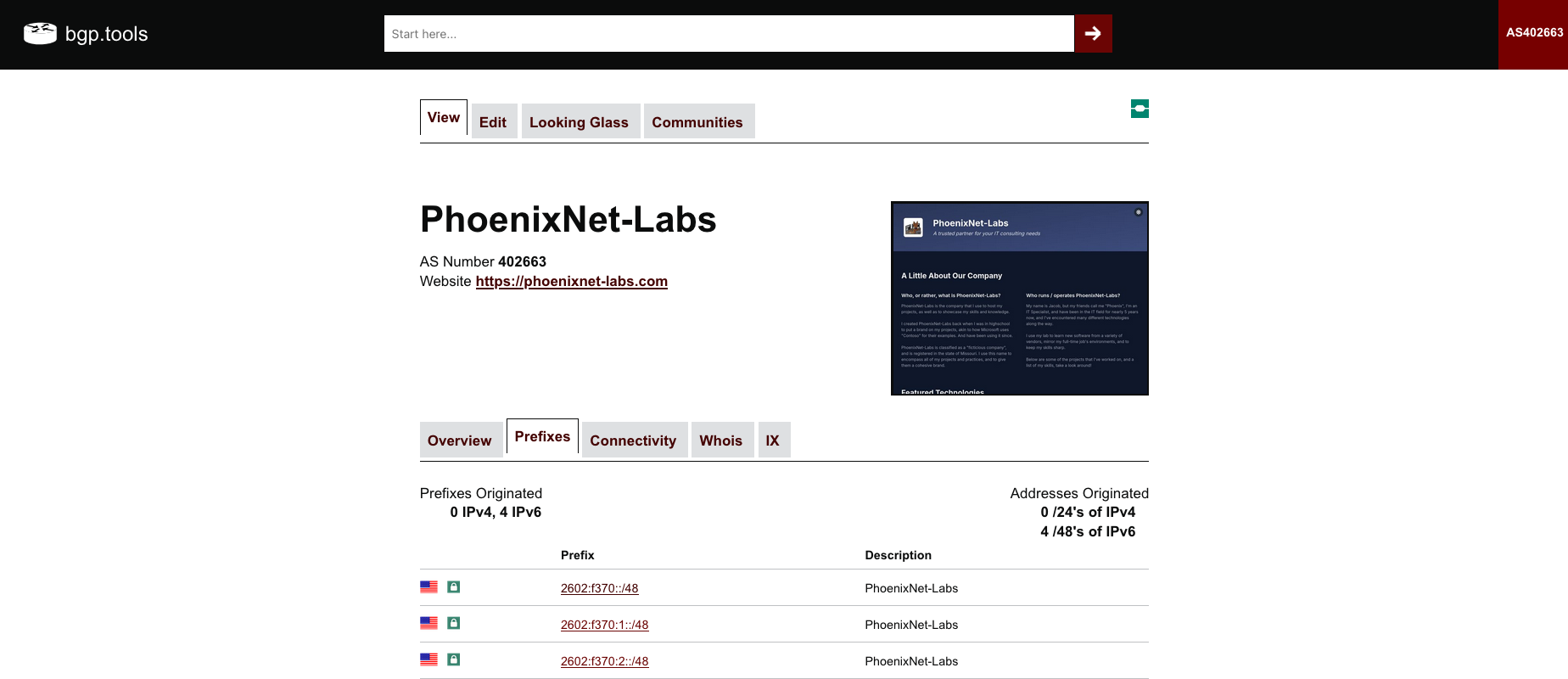
b) Verify prefixes are being announced properly via bgp.tools, this takes time.
c) Verify IRR and RPKI are properly setup
- This can get a bit in depth, but I strongly recommend looking up how to setup and properly configure IRR and RPKI.
- In short, you need to make sure that your upstream provider (Peer + IP Transit) is the only ASN that can announce your ASN's prefixes.
Determine your routing plan
Explain:
Now, you need to determine how are you going to route traffic to and from your hosts?
a) How are you going to route traffic from your bgp router to your hostsoutward and inward?
- Are they directly connected, or available to be connected?
- Can you digitally connect them? i.e. via Wireguard, or other site-to-site VPN solutions?
b) Explain vIXes and how they work.
- Virtual IXes, or vIX's are virtual internet exchanges, they offer IP Transit services and peering over tunnels for those who cannot directly connect at physical IX locations.
c) Break down BGP over Wireguard
- Whether you're connecting to a vIX, or your own BGP router from a remote site, you'll want to connect via a tunnel, and desirably Wireguard for it's ease of use, and security.
- I personally connect all of my sites to my BGP router via Wireguard, as my router(s) all support it for site-to-site connectivity.
Routing traffic within your networks
Explain:
Once you've gotten traffic tunneled in to your networks, you'll need to setup some routing policies and configure firewall rules. This varies from router to router.
a) Install a default route on your router via BGP (Setup BGP on your internal network router)
- This instructs traffic generated by subnets (under your prefix) on your network where to send traffic destined for the internet, or networks not within your network.
- I use Frr on OPNsense to implement BGP routing, and this installs a default route on my router automatically if advertised.
b) Discuss the pitfalls of asymmetric routing, and how it will create issues.
- One of the major pitfalls I ran into while working on the tail-end of this project was asymmetrical routing. By default, when a packet comes in, and the host wants to send another one out in relation to it, it will send it out it's preferred gateway (default) typically your provider's and not back to your BGP router. This creates an asymmetrical route, and typically most recipients will drop this traffic.
- To remediate this, you'll want to configure policy based routing to have traffic flow back down your tunnel back to your BGP router.
c) Setup policy based routing
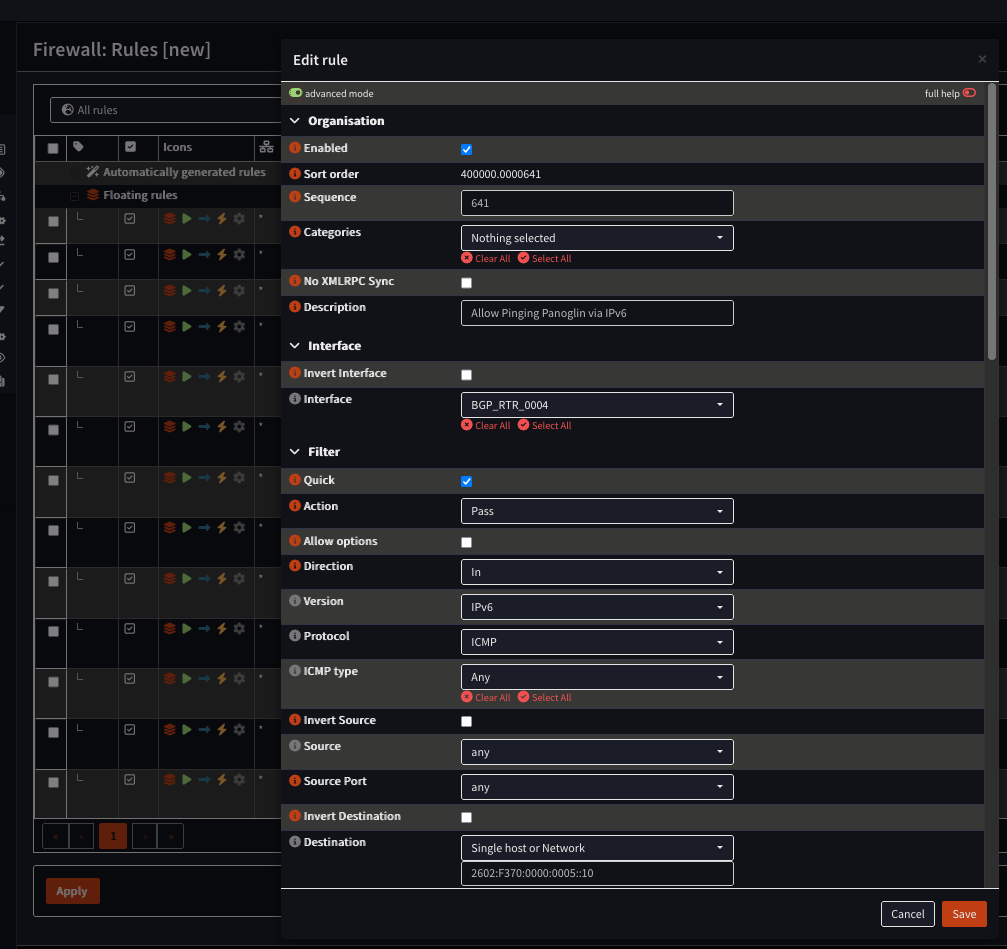
- Policy based routing is the routing of traffic based on policies determined by an administrator. I.e. you configure a firewall rule that allows traffic inward destined for port 443 towards a device on ::5, and specify a reply-to as the gateway leading to your BGP router. Below is an example of a policy that I've deployed.

d) Further subdivide prefixes at sites if needed
- Further sub-divide prefixes on hosts as needed for networks contained within those hosts, and route as needed.